

What is structured data?

When you scrape with a prompt, the AI reads the page and returns whatever JSON it decides makes sense. The shape can vary between runs. A field might appear with a different name. A field might be missing if the AI was not confident. If you are saving results to a database or processing them in code, this inconsistency is a problem. Structured output solves this. You add a schema to your request that describes the exact shape you want. The AI must return JSON that matches that shape exactly, with the field names, types, and nesting you defined. If the AI cannot find a value for a field, it writes null instead of skipping the field. Without a schema, asking for job details might give you:
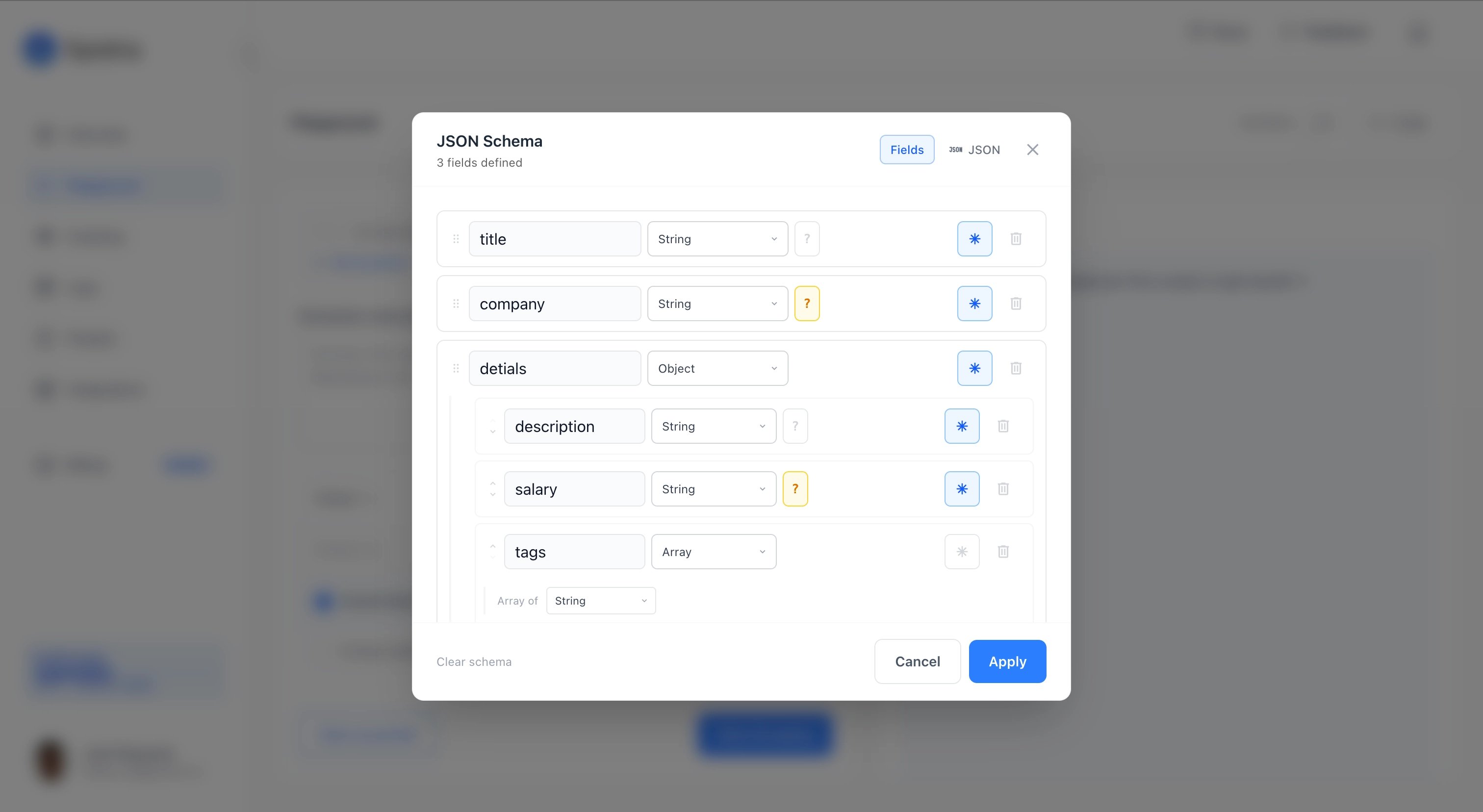
{ "Job Title": "Engineer", "pay": "$140k", "remote_ok": "yes" }
With a schema, you get exactly what you defined:
{ "title": "Engineer", "salary": 140000, "remote": true }
Same data, but the shape is now guaranteed.

Basic example

Add a schema field to your scrape request alongside your prompt. The schema is a standard JSON Schema object.
{
  "urls": [{ "url": "https://jobs.example.com/senior-engineer" }],
  "prompt": "Extract the job details from this posting",
  "schema": {
    "type": "object",
    "required": ["title", "company", "remote", "employment_type"],
    "properties": {
      "title":           { "type": "string" },
      "company":         { "type": "string" },
      "location":        { "type": ["string", "null"] },
      "remote":          { "type": ["boolean", "null"] },
      "salary_min":      { "type": ["number", "null"] },
      "salary_max":      { "type": ["number", "null"] },
      "employment_type": {
        "type": ["string", "null"],
        "enum": ["full_time", "part_time", "contract", null]
      },
      "skills": {
        "type": "array",
        "items": { "type": "string" }
      }
    }
  }
}
The response result.content will look like this when all the data is on the page:
{
  "title": "Senior Software Engineer",
  "company": "Acme Corp",
  "location": "Austin, TX",
  "remote": true,
  "salary_min": 140000,
  "salary_max": 180000,
  "employment_type": "full_time",
  "skills": ["Python", "React", "PostgreSQL", "Docker"]
}
And like this when salary information is not mentioned on the page:
{
  "title": "Senior Software Engineer",
  "company": "Acme Corp",
  "location": "Austin, TX",
  "remote": true,
  "salary_min": null,
  "salary_max": null,
  "employment_type": "full_time",
  "skills": ["Python", "React"]
}
The shape is the same either way. null means the AI looked for it and could not find it. The field is always there.

Using Zod or Pydantic?

Skip writing JSON Schema by hand. Generate it directly from your existing Zod or Pydantic model.

The required rule

This is the most important thing to understand about how structured data works. Fields listed in required are always in the output. If the AI cannot find a value, it writes null. The field is never missing. Fields not in required may be omitted. If the AI has no evidence for an optional field, it leaves it out of the response entirely rather than guessing. A concrete example. Say your schema has these properties:
"properties": {
  "title":    { "type": "string" },
  "company":  { "type": "string" },
  "salary":   { "type": ["number", "null"] },
  "benefits": { "type": ["string", "null"] }
}
If required is ["title", "company"], and the page has no salary or benefits info:
{ "title": "Engineer", "company": "Acme" }
The optional fields are completely absent. If required is ["title", "company", "salary", "benefits"], and the page still has no salary or benefits info:
{ "title": "Engineer", "company": "Acme", "salary": null, "benefits": null }
The fields are there, just null. Rule of thumb: put a field in required when you need it to always be present in your output, even as null. Leave it out of required when you are fine with it being absent if there is nothing to extract.

Nullable fields

To make a field nullable, pass the type as an array that includes "null":
{ "type": ["string", "null"] }
This means the field can be a string or null. If the AI finds the value, it writes the string. If not, it writes null. This works for all types:
{ "type": ["number", "null"] }
{ "type": ["boolean", "null"] }
{ "type": ["string", "null"] }

Enum fields

Use enum to restrict a field to a specific set of values. Include null in the enum list to allow null as a valid value.
{
  "type": ["string", "null"],
  "enum": ["full_time", "part_time", "contract", null]
}
The AI will pick the closest matching option from your list. If nothing fits, it uses null.
Be careful with required enum fields. If the field is in required and the AI cannot find clear evidence for any of your enum values, it must still write something. It will either pick the closest match or write null if you included it in the enum. Always include null in your enum when the field might not always appear on the page.

Nested objects

Your schema can include nested objects. Just define properties inside a properties value, the same way you would in any JSON Schema.
{
  "type": "object",
  "required": ["title", "company"],
  "properties": {
    "title":   { "type": "string" },
    "company": { "type": "string" },
    "salary": {
      "type": "object",
      "required": ["min", "max", "currency"],
      "properties": {
        "min":      { "type": ["number", "null"] },
        "max":      { "type": ["number", "null"] },
        "currency": { "type": ["string", "null"] }
      }
    }
  }
}
Output:
{
  "title": "Senior Engineer",
  "company": "Acme Corp",
  "salary": {
    "min": 140000,
    "max": 180000,
    "currency": "USD"
  }
}

Arrays of objects

To extract a list of items where each item has a fixed shape, use an array with an items definition.
{
  "type": "object",
  "required": ["products"],
  "properties": {
    "products": {
      "type": "array",
      "items": {
        "type": "object",
        "required": ["name", "price", "in_stock"],
        "properties": {
          "name":     { "type": "string" },
          "price":    { "type": ["number", "null"] },
          "in_stock": { "type": ["boolean", "null"] }
        }
      }
    }
  }
}
Output:
{
  "products": [
    { "name": "Wireless Headphones", "price": 79.99, "in_stock": true },
    { "name": "USB-C Hub",          "price": 34.99, "in_stock": true },
    { "name": "Laptop Stand",       "price": null,  "in_stock": false }
  ]
}
Every item in the array has the same shape. If a product has no listed price, that item gets null for price rather than being skipped.

Using prompt alongside schema

prompt and schema are designed to work together. The schema controls the output shape. The prompt guides how the AI interprets and normalizes the page content before filling in the schema. Use prompt to give the AI instructions about normalization, what to look for, or what to ignore:
{
  "urls": [{ "url": "https://jobs.example.com/engineer" }],
  "prompt": "Extract the job data. Normalize salary to a plain number in USD (drop symbols and commas). For employment_type, map contract-based and freelance roles to 'contract'. If the page shows salary as a range like '$140k - $180k', split into salary_min and salary_max.",
  "schema": {
    "type": "object",
    "required": ["title", "company", "salary_min", "salary_max", "employment_type"],
    "properties": {
      "title":           { "type": "string" },
      "company":         { "type": "string" },
      "salary_min":      { "type": ["number", "null"] },
      "salary_max":      { "type": ["number", "null"] },
      "employment_type": {
        "type": ["string", "null"],
        "enum": ["full_time", "part_time", "contract", null]
      }
    }
  }
}
Think of the prompt as instructions to the AI and the schema as the contract for the output. Both are optional on their own, but they are most powerful together.

Generating schemas with Zod or Pydantic

Spidra accepts standard JSON Schema. You can write that JSON by hand, or you can use a schema validation library in your own code to generate it. Zod (JavaScript / TypeScript)
import { z } from "zod";
import { zodToJsonSchema } from "zod-to-json-schema";

const JobSchema = z.object({
  title:           z.string(),
  company:         z.string(),
  location:        z.string().nullable(),
  remote:          z.boolean().nullable(),
  salary_min:      z.number().nullable(),
  salary_max:      z.number().nullable(),
  employment_type: z.enum(["full_time", "part_time", "contract"]).nullable(),
  skills:          z.array(z.string()),
});

const jsonSchema = zodToJsonSchema(JobSchema, { $schemaUrl: false });

const response = await fetch("https://api.spidra.io/api/scrape", {
  method: "POST",
  headers: {
    "Content-Type": "application/json",
    "x-api-key": "your-api-key",
  },
  body: JSON.stringify({
    urls: [{ url: "https://jobs.example.com/engineer" }],
    prompt: "Extract the job details",
    schema: jsonSchema,
  }),
});
Pydantic (Python)
from pydantic import BaseModel
from typing import Optional, Literal
import requests

class Job(BaseModel):
    title: str
    company: str
    location: Optional[str]
    remote: Optional[bool]
    salary_min: Optional[float]
    salary_max: Optional[float]
    employment_type: Optional[Literal["full_time", "part_time", "contract"]]
    skills: list[str]

json_schema = Job.model_json_schema()

response = requests.post(
    "https://api.spidra.io/api/scrape",
    headers={"x-api-key": "your-api-key"},
    json={
        "urls": [{"url": "https://jobs.example.com/engineer"}],
        "prompt": "Extract the job details",
        "schema": json_schema,
    },
)
You define and validate your data shape in your own code using the tools you already know. The resulting JSON Schema is what you pass to Spidra.
You can also use your Zod or Pydantic schema to validate the output you receive back from Spidra, giving you end-to-end type safety.

The full response

When your scrape job completes, poll GET /scrape/{jobId} as usual. The structured data appears in result.content as a parsed JSON object, not a string.
{
  "status": "completed",
  "progress": {
    "message": "Scraping completed successfully",
    "progress": 1
  },
  "result": {
    "content": {
      "title": "Senior Software Engineer",
      "company": "Acme Corp",
      "location": "Austin, TX",
      "remote": true,
      "salary_min": 140000,
      "salary_max": 180000,
      "employment_type": "full_time",
      "skills": ["Python", "React", "PostgreSQL"]
    },
    "screenshots": [],
    "ai_extraction_failed": false,
    "stats": {
      "durationMs": 8200,
      "captchaSolvedCount": 0,
      "inputTokens": 3100,
      "outputTokens": 180,
      "totalTokens": 3280
    }
  }
}
If the scrape job includes a schema, the job will fail rather than fall back to raw markdown when AI extraction cannot complete. This is intentional. When you pass a schema, you are expecting a specific shape, and returning unstructured markdown would be silently wrong.

Schema warnings

Some JSON Schema keywords are not supported by the AI model. If your schema includes them, Spidra strips them before processing and returns a schema_warnings list in the job status response so you know what was ignored.
{
  "status": "completed",
  "schema_warnings": [
    "Property 'title': keyword 'minLength' is not supported and will be ignored",
    "Property 'salary': keyword '$ref' is not supported and will be ignored"
  ],
  "result": { ... }
}
Warnings are non-fatal. The job still runs. But you should remove or replace the flagged keywords to make sure the AI is enforcing what you intended. Supported keywords: type, properties, required, items, enum, nullable, description Not supported: $ref, anyOf, oneOf, allOf, if/then/else, minLength, maxLength, minimum, maximum, pattern, additionalProperties

Schema validation errors

If your schema has a structural problem, the API returns a 422 error before the job is queued. No credits are used.
{
  "status": "error",
  "message": "Invalid schema. Fix the errors below and try again.",
  "errors": [
    "Root schema must be type 'object'",
    "Schema exceeds maximum nesting depth of 5"
  ]
}
Root schema must be type 'object' Your top-level schema must be { "type": "object", "properties": { ... } }. Passing an array or a plain string type at the root is not allowed. Schema exceeds maximum nesting depth of 5 Your schema has more than 5 levels of nested objects. Flatten the structure or move deeply nested data into a string field that the AI formats itself. Schema exceeds maximum size The schema JSON is over 10KB. Remove unused fields or descriptions to bring it under the limit.

Limits

LimitValue
Root typeMust be object
Maximum nesting depth5 levels
Maximum schema size10 KB

Field reference

schema (object) JSON Schema object describing the output shape. Root must be type: "object". When provided, output is automatically set to "json". prompt (string, optional) Extraction and normalization instructions. Works alongside schema to guide how the AI reads and maps the page content. output (string) You do not need to set this when using a schema. It is automatically forced to "json".

Submit a Scrape Job

Full API reference for the POST /scrape endpoint

Browser Actions

Combine structured output with forEach to extract lists of items