

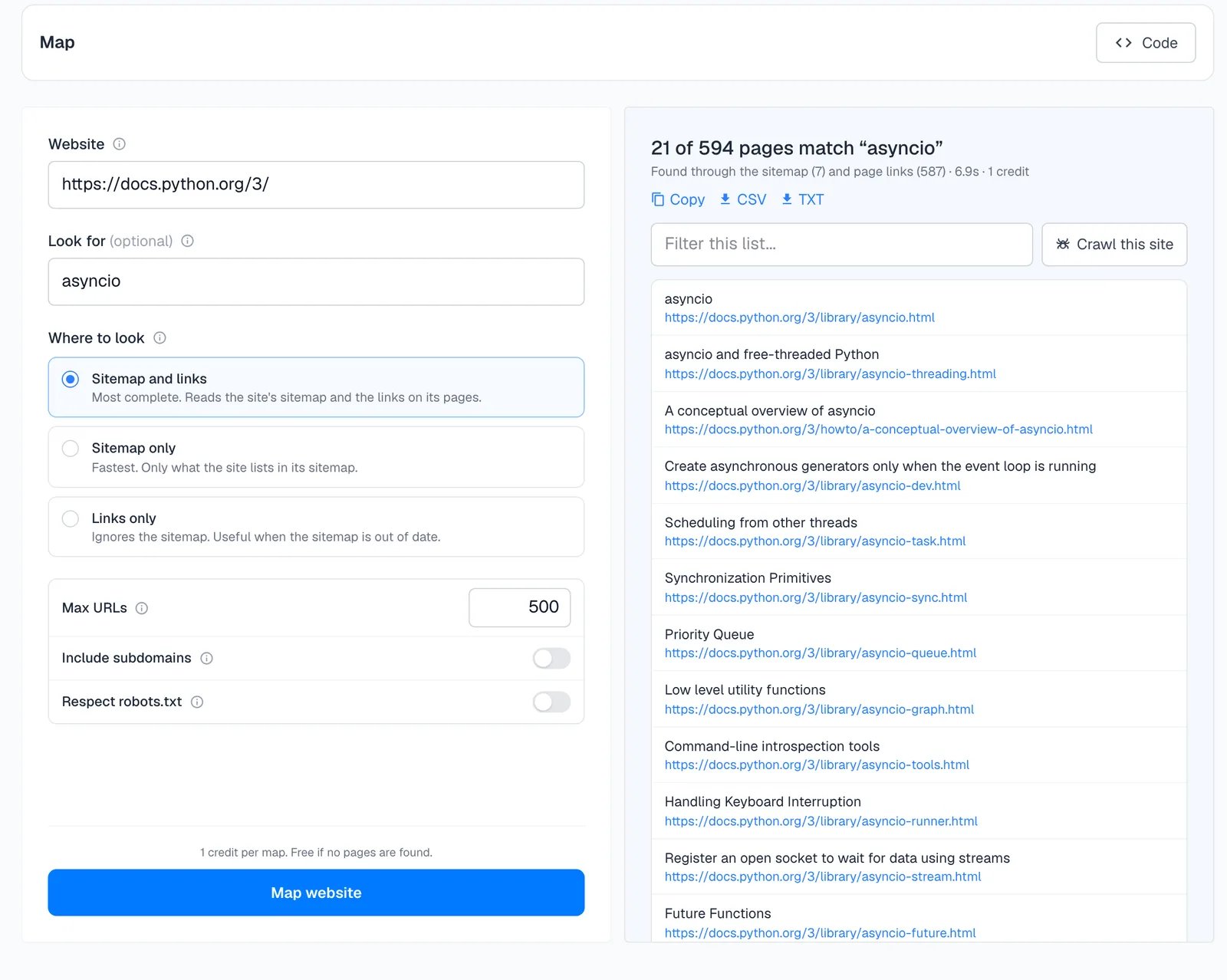
The form
- Website. The site to map. Any page on it works. The home page or a docs index gives the most complete list.
- Look for (optional). Only list pages related to these words, best matches first. It matches the words in URLs and in the link text, in any language.
- Where to look. Sitemap and links is the most complete. Sitemap only is the fastest and lists only what the site publishes in its sitemap. Links only ignores the sitemap, which helps when the sitemap is out of date.
- Max URLs. Up to 5,000. The default is 500.
- Include subdomains. Also list pages on subdomains, such as
docs.example.comfromexample.com. - Respect robots.txt. Leave out pages the site’s robots.txt asks crawlers to avoid.
The results
The header says how many pages matched out of how many were found, where they came from, how long it took and what it cost. Mapping docs.python.org forasyncio found 594 pages and listed the 21 about asyncio, with the link text as each page’s title.
- Copy, CSV and TXT export the list.
- Filter this list narrows the results without mapping again.
- Crawl this site opens a crawl from the same website.
- Scrape on any row opens that page in the Scrape playground.
What it costs
1 credit per map, whatever the number of URLs. A map that finds nothing is free. See How credits work.Map with code
Crawl
Extract data from the pages you found
Batch scrape
Scrape a list of URLs in one request