

Quick example
Get the title, price and stock of the books in one category:jobId; poll GET /crawl/{jobId} until status is completed. The SDKs wait for you. The result has one entry per page (html and markdown links left out):
How a crawl finds pages
- It works out what you want. Spidra reads your
crawlInstructionand the start page and decides what kind of page you mean. Here it understood “Individual book detail pages in the mystery category.” - It follows links toward those pages, through category, listing and section pages if it has to, and reads the site’s sitemap.
- It stays where it started. A crawl from
/blogdoesn’t wander to/pricing. SetcrawlEntireDomainto allow the whole domain. - It returns only the pages you asked for. Pages read only to reach others are navigation pages: not returned, not charged. The start page is returned only if it’s itself the kind of page you asked for.
- It extracts. Your
transformInstructionorschemaruns on every returned page. With neither, each page’sdatais its Markdown and no AI runs.
Individual job postings works better than jobs, because a jobs site also has search, category and company pages. All pages returns every page in the part of the site you started in. Instructions work in any language.
What you get back
Each page inresult has url, status, title, data (your extracted data, or Markdown), depth (clicks from the start page), parentUrl (where it was found), and links to the stored html and markdown. The links expire, so read them soon or download the ZIP.
GET /crawl/{jobId} holds the first 100 pages. For bigger crawls it adds "resultTruncated": true, and you read every page with GET /crawl/{jobId}/pages in pages of up to 1,000. The Python SDK’s crawl() reads them all for you.
Without a schema, each page’s data takes whatever shape the AI picks, and it can differ between pages. Use a schema when code reads the result.
Why a page wasn’t returned
Every finished crawl has a report: what Spidra looked for, how many navigation pages it read, and every link it skipped with the reason and the page it was on.
Missing a page? Make the instruction more specific, add an
includePaths pattern that matches it, or raise maxPages.
Options
Every field is in the API reference.
After the crawl
- Extract again without crawling again. POST /crawl/{jobId}/extract runs a new
transformInstructionon the saved pages. It’s quick and costs only the AI tokens. Good for trying different prompts. - Retry one page’s extraction with POST /crawl/{jobId}/retry/{pageId} if it came back empty.
- Download everything as a ZIP with each page’s data, Markdown and HTML.
- Cancel a running crawl with
DELETE /crawl/{jobId}. Pages already done are kept.
Cost
1 credit per page returned, plus AI credits when you extract, plus 5 per CAPTCHA solved. Navigation pages, failed pages and failed crawls are free. Re-extracting and page retries cost only AI tokens. When your balance can’t covermaxPages, the crawl isn’t refused: it runs with maxPages lowered to what your credits cover, and the response says so (maxPagesRequested and a message). Credits held for pages that weren’t needed come back at the end.
In the dashboard
Open Crawl in the sidebar: Website, What pages do you want?, What to extract (with Use a schema), and Options for Max pages, Max depth, Stealth Mode, Fast mode and More settings (path filters, sitemap, subdomains, robots.txt, webhook and login cookies). See its pages first opens Map for the same site. Results show as pages finish, and How this crawl worked shows the report above them.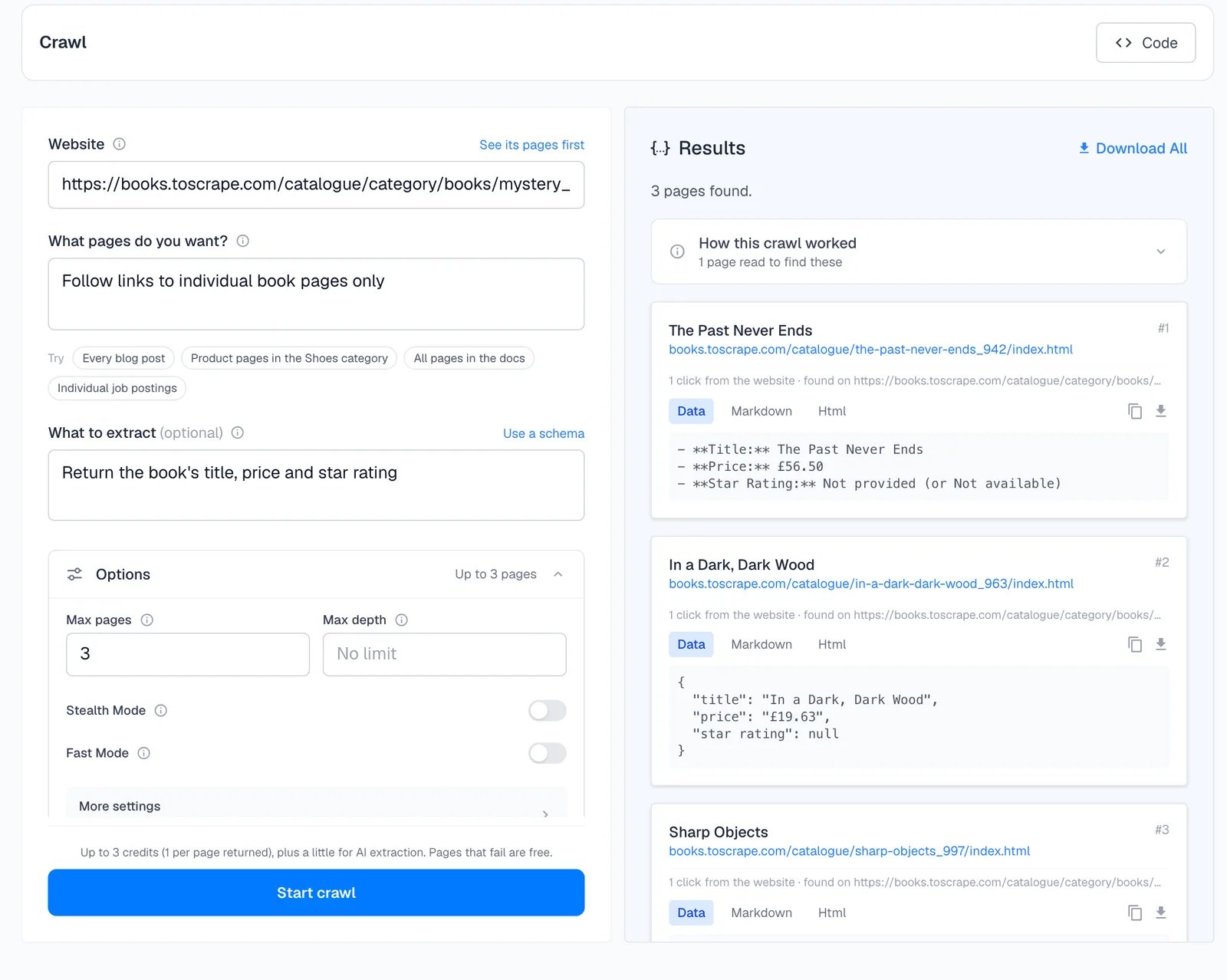
Tips
- Start with
maxPagesof 3 to 5 to check your instruction, then raise it. - Start the crawl at the section you want (
/blog,/docs, a category page). - Use the instruction to steer and path filters to fence.
- Read the report before raising
maxPageswhen pages are missing.
Next
Map
See a site’s pages first.
Build a RAG knowledge base
Crawl a docs site into clean Markdown.
Structured output
Schemas that keep every page the same.
API reference
Every field and response.