> ## Documentation Index
> Fetch the complete documentation index at: https://docs.spidra.io/llms.txt
> Use this file to discover all available pages before exploring further.
# Parse
> Turn PDFs, Word, Excel and PowerPoint files into clean Markdown, page by page, from an upload or a link. Scanned pages are read with AI, and you can extract fields as JSON.
Parse turns a document into clean Markdown, page by page. Upload a file or paste a link to one: PDF, Word, Excel, PowerPoint, OpenDocument, RTF, EPUB, CSV or HTML. Pages that have their own text are read directly. Pages that are scans or images are read with AI, and only those pages, so a mostly digital document stays fast. Add what to extract and you get the fields as JSON too.
Open it from **Parse** in the dashboard sidebar, from the [API](/api-reference/parse/parse) or an SDK, or by asking an AI assistant connected to the [MCP server](/sdks/mcp).
 ## Add documents
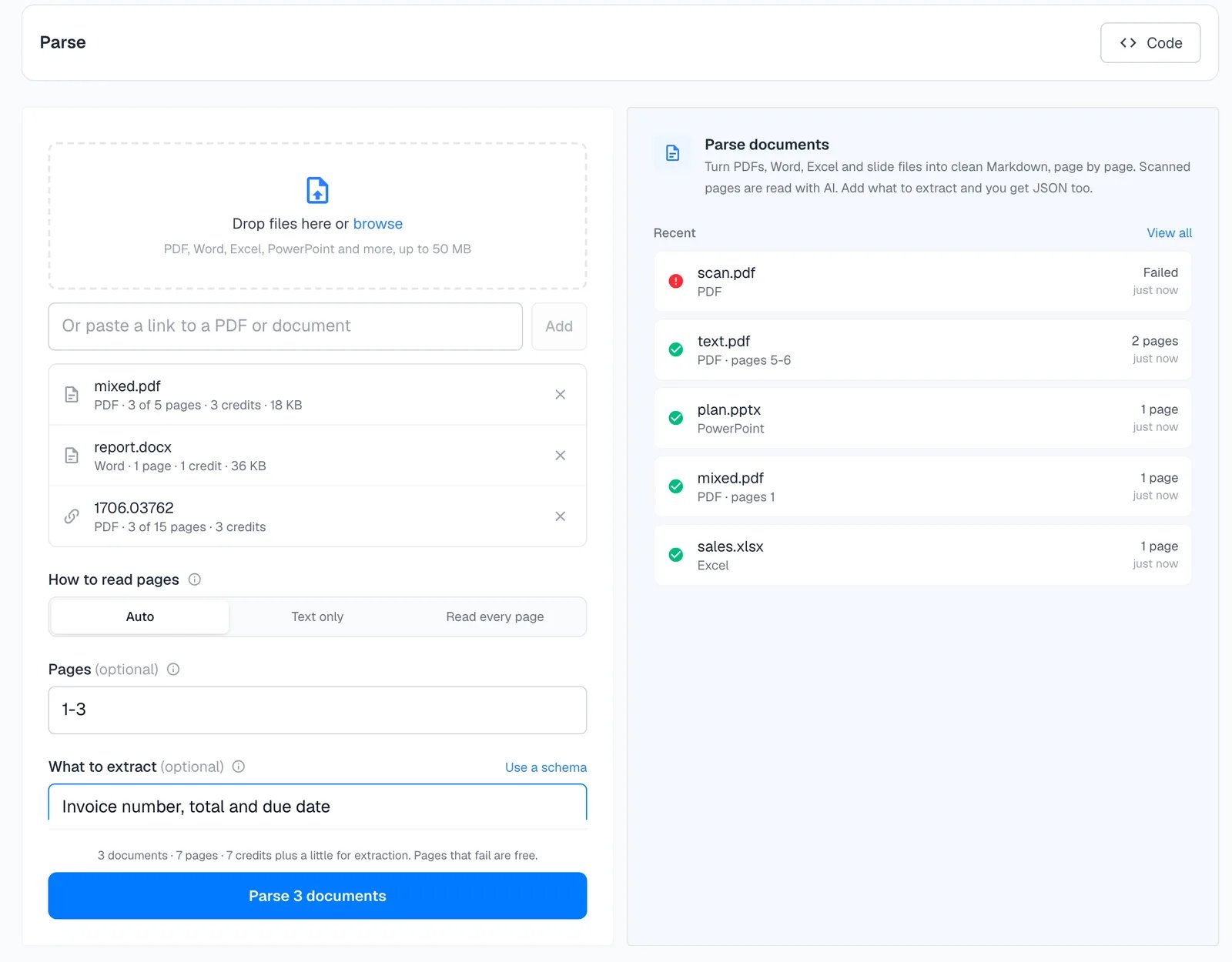
* **Upload:** drop files on the page or click browse. Up to 50 MB each in the dashboard. The API also takes prepared uploads up to 500 MB.
* **Link:** paste a link to a PDF or document and press Add.
Each document is checked as soon as you add it. You see its type, pages and credits before anything is charged, and you can remove what you don't want.
## Options
* **How to read pages.** **Auto** reads each page's own text and uses AI only for scans. **Text only** never uses AI and skips scanned pages. **Read every page** uses AI on all pages, for documents whose text layer is unreliable.
* **Pages.** Parse only some pages of each PDF, such as `1-5`, `1-3, 8` or `10-` (page 10 to the end). Costs update as you type.
* **What to extract.** Describe the fields you want, or define a [schema](/features/structured-output), and the result includes them as JSON.
## The result
## Add documents
* **Upload:** drop files on the page or click browse. Up to 50 MB each in the dashboard. The API also takes prepared uploads up to 500 MB.
* **Link:** paste a link to a PDF or document and press Add.
Each document is checked as soon as you add it. You see its type, pages and credits before anything is charged, and you can remove what you don't want.
## Options
* **How to read pages.** **Auto** reads each page's own text and uses AI only for scans. **Text only** never uses AI and skips scanned pages. **Read every page** uses AI on all pages, for documents whose text layer is unreliable.
* **Pages.** Parse only some pages of each PDF, such as `1-5`, `1-3, 8` or `10-` (page 10 to the end). Costs update as you type.
* **What to extract.** Describe the fields you want, or define a [schema](/features/structured-output), and the result includes them as JSON.
## The result
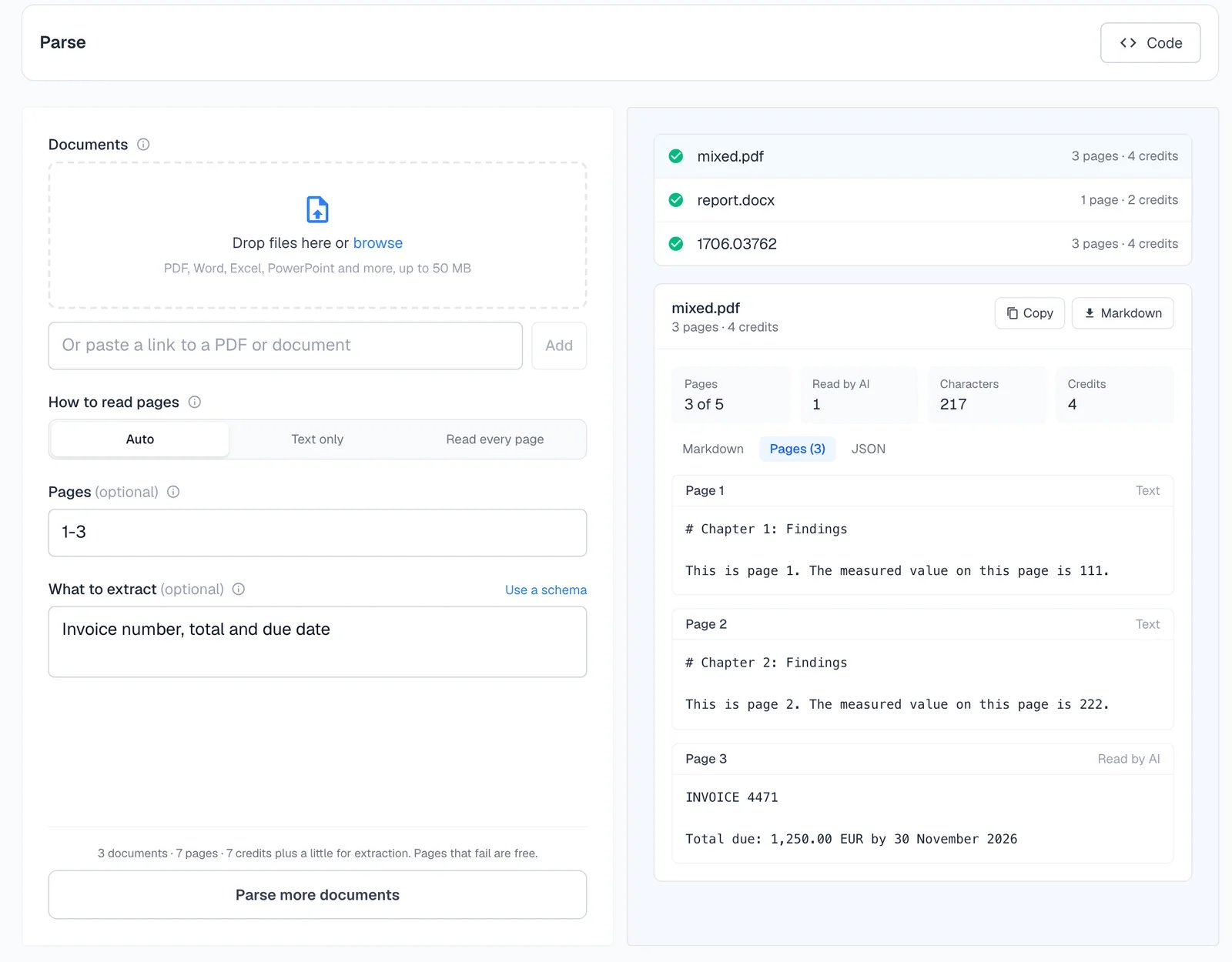 Each document shows its progress, then its result:
* **Markdown:** the whole document.
* **Pages:** each page on its own, marked **Text** or **Read by AI**.
* **JSON:** the extracted fields, when you asked for some.
Copy or download any of them. Every parsed document is also in [Logs](/features/logs) under Parse, where you can reopen it.
A real run on a five-page PDF whose third page is a scanned invoice, with pages `1-3` and the instruction `Invoice number, total and due date`:
```json theme={null}
{
"pagesParsed": 3,
"creditsUsed": 4,
"pages": [
{ "pageNumber": 1, "method": "text", "markdown": "# Chapter 1: Findings\n\nThis is page 1. ..." },
{ "pageNumber": 2, "method": "text", "markdown": "# Chapter 2: Findings\n\nThis is page 2. ..." },
{ "pageNumber": 3, "method": "ocr", "markdown": "INVOICE 4471\n\nTotal due: 1,250.00 EUR by 30 November 2026" }
],
"json": { "invoice_number": "4471", "total": "1,250.00 EUR", "due_date": "30 November 2026" }
}
```
## What it costs
1 credit per page parsed, whether the page was read from its text or with AI. Word, Excel and other formats count one page per 3,000 characters of output, at least one. Extraction adds AI token credits. Pages that can't be read and documents that fail are free. See [How credits work](/billing/how-credits-work#parse).
## Privacy
Uploaded files are kept for 24 hours so you can parse them again with other options, then deleted. Delete one sooner with [DELETE /parse/files/\{fileId}](/api-reference/parse/parse-uploads#delete-an-uploaded-file). Parsed results are kept like your other logs.
## Parse with code
```bash curl theme={null}
curl -X POST https://api.spidra.io/api/parse \
-H "Authorization: Bearer $SPIDRA_API_KEY" \
-F "file=@report.pdf" \
-F 'options={"pages":"1-10","prompt":"Invoice number, total and due date"}'
```
```typescript Node.js theme={null}
const doc = await spidra.parse(
{ file: await readFile("report.pdf"), fileName: "report.pdf" },
{ pages: "1-10", prompt: "Invoice number, total and due date" }
);
console.log(doc.markdown, doc.json);
```
```python Python theme={null}
doc = client.parse("report.pdf", pages="1-10", prompt="Invoice number, total and due date")
print(doc.markdown, doc.json)
```
Every option, response field and error
For web pages rather than documents
This documentation is built and hosted on [Mintlify](https://mintlify.com), a developer documentation platform.
Each document shows its progress, then its result:
* **Markdown:** the whole document.
* **Pages:** each page on its own, marked **Text** or **Read by AI**.
* **JSON:** the extracted fields, when you asked for some.
Copy or download any of them. Every parsed document is also in [Logs](/features/logs) under Parse, where you can reopen it.
A real run on a five-page PDF whose third page is a scanned invoice, with pages `1-3` and the instruction `Invoice number, total and due date`:
```json theme={null}
{
"pagesParsed": 3,
"creditsUsed": 4,
"pages": [
{ "pageNumber": 1, "method": "text", "markdown": "# Chapter 1: Findings\n\nThis is page 1. ..." },
{ "pageNumber": 2, "method": "text", "markdown": "# Chapter 2: Findings\n\nThis is page 2. ..." },
{ "pageNumber": 3, "method": "ocr", "markdown": "INVOICE 4471\n\nTotal due: 1,250.00 EUR by 30 November 2026" }
],
"json": { "invoice_number": "4471", "total": "1,250.00 EUR", "due_date": "30 November 2026" }
}
```
## What it costs
1 credit per page parsed, whether the page was read from its text or with AI. Word, Excel and other formats count one page per 3,000 characters of output, at least one. Extraction adds AI token credits. Pages that can't be read and documents that fail are free. See [How credits work](/billing/how-credits-work#parse).
## Privacy
Uploaded files are kept for 24 hours so you can parse them again with other options, then deleted. Delete one sooner with [DELETE /parse/files/\{fileId}](/api-reference/parse/parse-uploads#delete-an-uploaded-file). Parsed results are kept like your other logs.
## Parse with code
```bash curl theme={null}
curl -X POST https://api.spidra.io/api/parse \
-H "Authorization: Bearer $SPIDRA_API_KEY" \
-F "file=@report.pdf" \
-F 'options={"pages":"1-10","prompt":"Invoice number, total and due date"}'
```
```typescript Node.js theme={null}
const doc = await spidra.parse(
{ file: await readFile("report.pdf"), fileName: "report.pdf" },
{ pages: "1-10", prompt: "Invoice number, total and due date" }
);
console.log(doc.markdown, doc.json);
```
```python Python theme={null}
doc = client.parse("report.pdf", pages="1-10", prompt="Invoice number, total and due date")
print(doc.markdown, doc.json)
```
Every option, response field and error
For web pages rather than documents
This documentation is built and hosted on [Mintlify](https://mintlify.com), a developer documentation platform.