> ## Documentation Index
> Fetch the complete documentation index at: https://docs.spidra.io/llms.txt
> Use this file to discover all available pages before exploring further.
# Map
> List every page URL on a website in a few seconds, without scraping them. Search the list, export it, or crawl and scrape the pages you pick.
Map lists the pages of a website without opening each one. It reads the site's sitemap and the links on its pages, and answers in a few seconds for 1 credit. Use it to see what a site contains, find the exact pages you want, then [crawl](/features/crawling) or [batch scrape](/features/batch-scraping) them.
Open it from **Map** in the dashboard sidebar, from the [API or an SDK](/api-reference/crawling/map), or by asking an AI assistant connected to the [MCP server](/sdks/mcp).
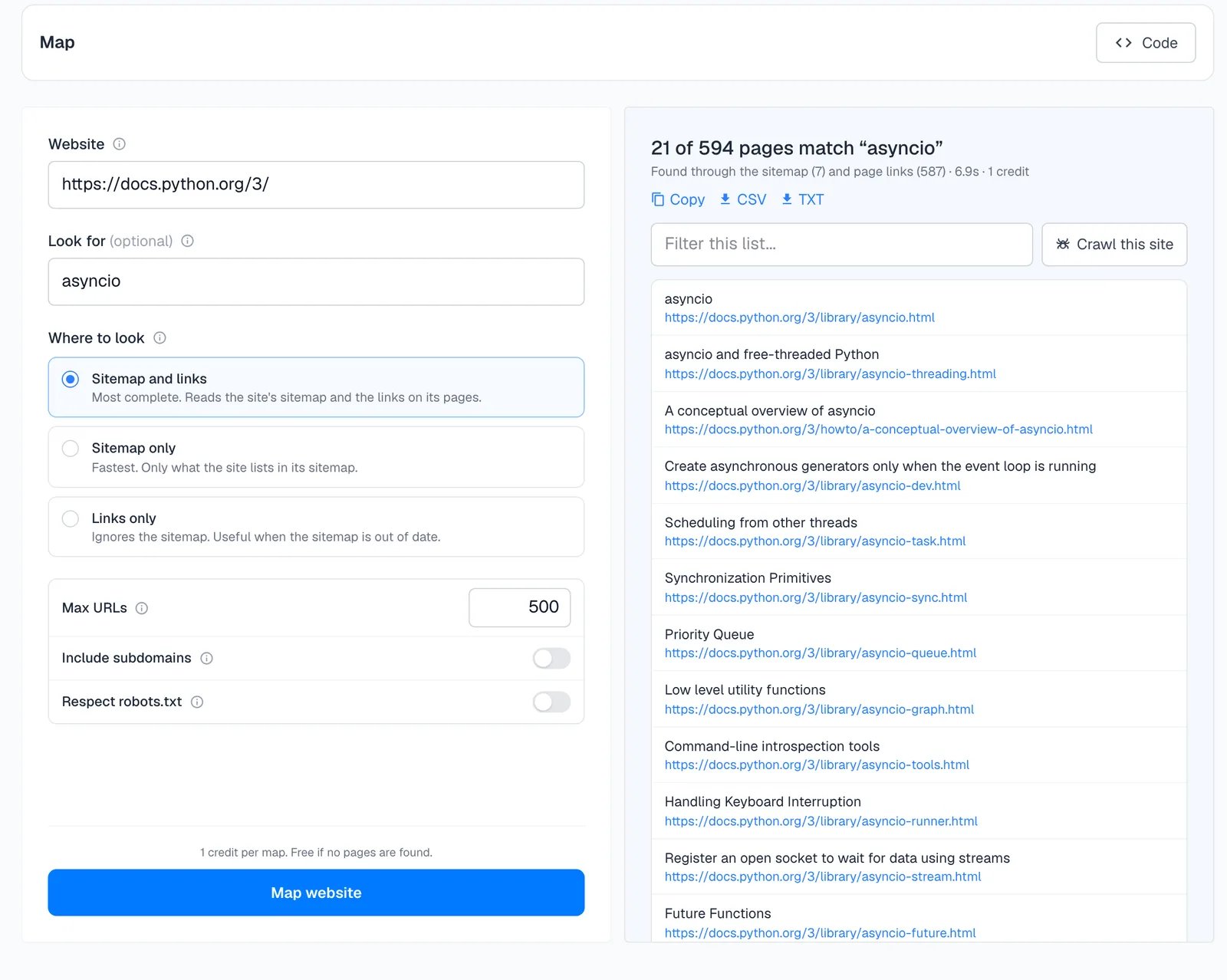 ## The form
* **Website.** The site to map. Any page on it works. The home page or a docs index gives the most complete list.
* **Look for (optional).** Only list pages related to these words, best matches first. It matches the words in URLs and in the link text, in any language.
* **Where to look.** **Sitemap and links** is the most complete. **Sitemap only** is the fastest and lists only what the site publishes in its sitemap. **Links only** ignores the sitemap, which helps when the sitemap is out of date.
* **Max URLs.** Up to 5,000. The default is 500.
* **Include subdomains.** Also list pages on subdomains, such as `docs.example.com` from `example.com`.
* **Respect robots.txt.** Leave out pages the site's robots.txt asks crawlers to avoid.
The line above the **Map website** button shows the cost before you run it. Past maps are listed under the form and in [Logs](/features/logs) under **Map**.
## The results
The header says how many pages matched out of how many were found, where they came from, how long it took and what it cost. Mapping docs.python.org for `asyncio` found 594 pages and listed the 21 about asyncio, with the link text as each page's title.
* **Copy, CSV and TXT** export the list.
* **Filter this list** narrows the results without mapping again.
* **Crawl this site** opens a crawl from the same website.
* **Scrape** on any row opens that page in the [Scrape playground](/features/playground).
## What it costs
1 credit per map, whatever the number of URLs. A map that finds nothing is free. See [How credits work](/billing/how-credits-work).
## Map with code
```bash curl theme={null}
curl -X POST https://api.spidra.io/api/map \
-H "Authorization: Bearer $SPIDRA_API_KEY" \
-H "Content-Type: application/json" \
-d '{ "url": "https://docs.python.org/3/", "search": "asyncio", "limit": 20 }'
```
```typescript Node.js theme={null}
const { links } = await spidra.map({ url: "https://docs.python.org/3/", search: "asyncio", limit: 20 });
```
```python Python theme={null}
result = client.map("https://docs.python.org/3/", search="asyncio", limit=20)
```
The [Map endpoint reference](/api-reference/crawling/map) lists every option and how Map finds URLs.
Extract data from the pages you found
Scrape a list of URLs in one request
This documentation is built and hosted on [Mintlify](https://mintlify.com), a developer documentation platform.
## The form
* **Website.** The site to map. Any page on it works. The home page or a docs index gives the most complete list.
* **Look for (optional).** Only list pages related to these words, best matches first. It matches the words in URLs and in the link text, in any language.
* **Where to look.** **Sitemap and links** is the most complete. **Sitemap only** is the fastest and lists only what the site publishes in its sitemap. **Links only** ignores the sitemap, which helps when the sitemap is out of date.
* **Max URLs.** Up to 5,000. The default is 500.
* **Include subdomains.** Also list pages on subdomains, such as `docs.example.com` from `example.com`.
* **Respect robots.txt.** Leave out pages the site's robots.txt asks crawlers to avoid.
The line above the **Map website** button shows the cost before you run it. Past maps are listed under the form and in [Logs](/features/logs) under **Map**.
## The results
The header says how many pages matched out of how many were found, where they came from, how long it took and what it cost. Mapping docs.python.org for `asyncio` found 594 pages and listed the 21 about asyncio, with the link text as each page's title.
* **Copy, CSV and TXT** export the list.
* **Filter this list** narrows the results without mapping again.
* **Crawl this site** opens a crawl from the same website.
* **Scrape** on any row opens that page in the [Scrape playground](/features/playground).
## What it costs
1 credit per map, whatever the number of URLs. A map that finds nothing is free. See [How credits work](/billing/how-credits-work).
## Map with code
```bash curl theme={null}
curl -X POST https://api.spidra.io/api/map \
-H "Authorization: Bearer $SPIDRA_API_KEY" \
-H "Content-Type: application/json" \
-d '{ "url": "https://docs.python.org/3/", "search": "asyncio", "limit": 20 }'
```
```typescript Node.js theme={null}
const { links } = await spidra.map({ url: "https://docs.python.org/3/", search: "asyncio", limit: 20 });
```
```python Python theme={null}
result = client.map("https://docs.python.org/3/", search="asyncio", limit=20)
```
The [Map endpoint reference](/api-reference/crawling/map) lists every option and how Map finds URLs.
Extract data from the pages you found
Scrape a list of URLs in one request
This documentation is built and hosted on [Mintlify](https://mintlify.com), a developer documentation platform.