> ## Documentation Index
> Fetch the complete documentation index at: https://docs.spidra.io/llms.txt
> Use this file to discover all available pages before exploring further.
# Plans and Pricing
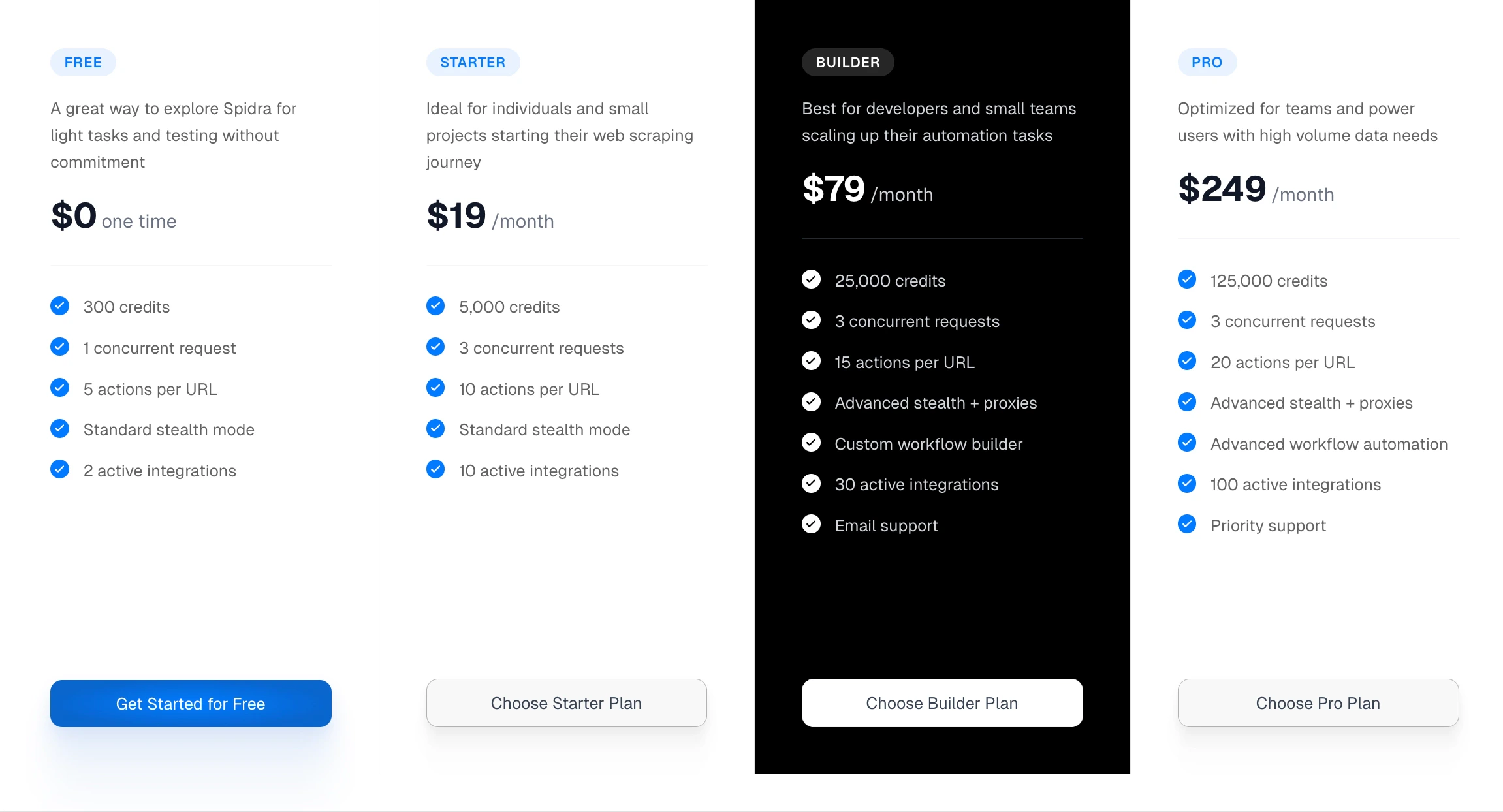
> Spidra pricing plans — Free, Starter ($19/mo), Builder ($79/mo), Pro ($249/mo), and Enterprise. Credit allowances, concurrency limits, and bandwidth quotas per plan.
Spidra has four standard plans and an Enterprise option for teams with custom needs. Every plan gives you access to the core scraping and crawling features. What changes between plans is how many credits you get per month, how much proxy bandwidth is included, how many URLs you can submit per request, and what support you can expect.
 Credits reset at the start of every billing cycle. Unused monthly credits do not carry forward. Top-up credits are the exception — see [Credit Top-ups](/billing/top-ups) for details.
## What Each Plan Is Good For
* **Free** is for trying Spidra out. You get 300 credits and 50 MB of proxy bandwidth per month, which covers light testing or personal one-off scrapes. **There is no credit card required to sign up**.
* **Starter** works well for small projects, side projects, or individuals who scrape regularly but not at high volume. At 5,000 credits and 500 MB of bandwidth per month you can run a few dozen scrapes daily without hitting your limit.
* **Builder** is for developers building scraping into a product or workflow. 25,000 credits and 2 GB of bandwidth per month gives you a lot of room, and Advanced stealth mode means better results on sites with aggressive anti-bot protection.
* **Pro** is for teams and high-volume use cases. 125,000 credits and 5 GB of proxy bandwidth per month, 20 actions per URL, and priority support are the main differences from Builder.
* **Enterprise** is for organizations that need custom credit volumes, dedicated infrastructure, SLAs, or anything that does not fit the standard plans. [Contact us](mailto:hello@spidra.io) to talk through what you need.
## Switching Plans
You can upgrade or downgrade from the [Billing page](https://app.spidra.io/dashboard/billing) in your dashboard at any time.
When you upgrade, you move to the new plan immediately. When you downgrade or cancel, you keep your current plan until the end of your billing cycle. See [Managing Your Subscription](/billing/managing-subscription) for the full details.
Credits reset at the start of every billing cycle. Unused monthly credits do not carry forward. Top-up credits are the exception — see [Credit Top-ups](/billing/top-ups) for details.
## What Each Plan Is Good For
* **Free** is for trying Spidra out. You get 300 credits and 50 MB of proxy bandwidth per month, which covers light testing or personal one-off scrapes. **There is no credit card required to sign up**.
* **Starter** works well for small projects, side projects, or individuals who scrape regularly but not at high volume. At 5,000 credits and 500 MB of bandwidth per month you can run a few dozen scrapes daily without hitting your limit.
* **Builder** is for developers building scraping into a product or workflow. 25,000 credits and 2 GB of bandwidth per month gives you a lot of room, and Advanced stealth mode means better results on sites with aggressive anti-bot protection.
* **Pro** is for teams and high-volume use cases. 125,000 credits and 5 GB of proxy bandwidth per month, 20 actions per URL, and priority support are the main differences from Builder.
* **Enterprise** is for organizations that need custom credit volumes, dedicated infrastructure, SLAs, or anything that does not fit the standard plans. [Contact us](mailto:hello@spidra.io) to talk through what you need.
## Switching Plans
You can upgrade or downgrade from the [Billing page](https://app.spidra.io/dashboard/billing) in your dashboard at any time.
When you upgrade, you move to the new plan immediately. When you downgrade or cancel, you keep your current plan until the end of your billing cycle. See [Managing Your Subscription](/billing/managing-subscription) for the full details.